
Showing posts with label IPhone. Show all posts
Showing posts with label IPhone. Show all posts
Wednesday, March 13, 2013
evasi0n - iOS 6.0-6.1.2 Jailbreak
Today, a group of iOS hackers know as the Evad3rs team has released the new iOS jailbreak tool called "evasi0n" , available to download for Windows, Mac, and Linux to jailbreak devices running iOS 6 through 6.1,6.1.2 The new jailbreak tool is compatible with all of Apple's currently available devices, including the iPhone 5 and iPad Mini. The jailbreak process is incredibly simple. To accomplish the task, you need only have a computer running computer with tool, before you go hacking your hardware, it's advisable to back up your data. After that, you're mere clicks away from total iPhone freedom. Enjoy!
Download it from here..!!
Download Evasi0n For Windows
Download Evasi0n For Mac

Monday, February 4, 2013
iOS 6.1 Jailbreak Tool evasi0n now available for download
iOS 6.1 Jailbreak Tool evasi0n now available for download

Today, a group of iOS hackers know as the Evad3rs team has released the new iOS jailbreak tool called "evasi0n" , available to download for Windows, Mac, and Linux to jailbreak devices running iOS 6 through 6.1. The new jailbreak tool is compatible with all of Apple's currently available devices, including the iPhone 5 and iPad Mini. The jailbreak process is incredibly simple. To accomplish the task, you need only have a computer running computer with tool, before you go hacking your hardware, it's advisable to back up your data. After that, you're mere clicks away from total iPhone freedom. Enjoy!
Download it from here..!! http://evasi0n.com/
Download it from here..!! http://evasi0n.com/
Sunday, November 11, 2012
How to Download and Install Paid iPhone Apps for Free(from cydia)
How to Download and Install Paid iPhone Apps for Free(from cydia)
 iPhone as already taken the place of the best smartphone in the Worlds tech market, now it contains millions of apps which you would love have your hands on. Now obviously all the apps are not sold for free they have some apps which are free and good to play but the paid ones are just awesome as they have more functionality and more levels in terms of games so how you can get those apps for free.
Well now you can get all those apps fro free using two awesome methods. Using “AppTrackr” or using a small app called “Installous” so check out below how these both stuff works out and have fun getting apps and games for free. We have already posted on how to install paid Cydia Apps for free you can check that too.
1. Using Installous :
Description : Installous is a free simple app developed by Hackulo.us delivering a rich environment for downloading and installing all paid iPhone Apps for free and that too right on your iPhone.How to use Installous : If you want to install Installous on your iPhone than you need to have a Jailbroken iPhone so make sure it has Cydia installed on it else make a Google search for the latest Jailbreak as we have no tutorial on it. Now fire up your cydia app and than navigate to Manage > Sources > Edit > Add and than type http://cydia.hackulo.usnow click on Add Source and than click on Add Anyway.
Now it will download all the files from the internet so you should be on a Wi-Fi Connection, and after few seconds you will have it in your sources now click that source name and than click on Installous now hit Install and than wait for it to install and than you will have it right on your iPhone Springboard.

Now browse through its big apps database and than download + install the one you like, its totally for free you just need need to enter the captcha and than it will take you to the download website where you can wait and download it to your Installous app. After its downloaded you will see that app in the Downloads section in Installous so just click on that app and than choose Install that’s it.
2. Using AppTrackr :
Description : AppTrackr is the online website which also contains huge apps database like Installous but with this you can download these apps right on your computer and hence transfer it to your iPhone. You can download these apps using Internet Download Managerfor faster speeds as apps are big in size.How to use AppTrackr : Now if you wanna download Apps via AppTrackr than you can simply visit their website http://apptrackr.org/ and than find apps you want for your iPhone and than download them easily using simply file hosting service. AppTrackr provides you with all the basic information like screenshots for apps and games so its more convenient for you to check that app before you download it.
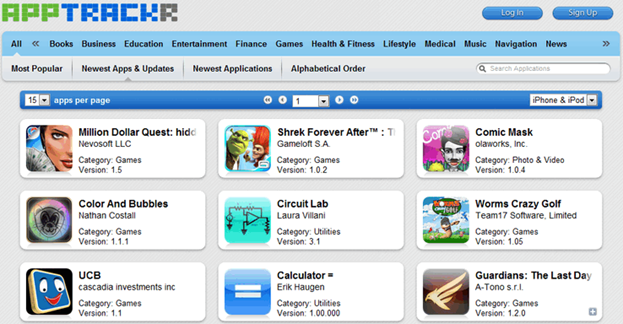
Point To Note : If you download apps via AppTrackr than @ time of transferring them to your iPhone you need to have Installous or App Sync which comes bundled with Installous, so in brief your iPhone should be Jailbroken and you should have Installous than you can easily transfer apps from your PC to your iPhone using iTunes.
So these were two marvoulous methods you can use to download paid apps for free on your iPhone, there might be any other way to download if you know that than you can share that with us using comment section below. Have fun guys :)
Now Get iOS 6 Features right on your Jailbroken iOS 5.1.1
Now Get iOS 6 Features right on your Jailbroken iOS 5.1.1
If you are aware about the upcoming iOS 6 firmware update from apple for the iDevices than you might also be aware that its going to be equipped many new awesome features which you you might wanna miss out. Well so right now if you wanna get some iOS 6 taste on your older iOS 5.1.1 jailbroken firmware than we have some list of apps and tweaks which you can install from cydia and get a view of those features.
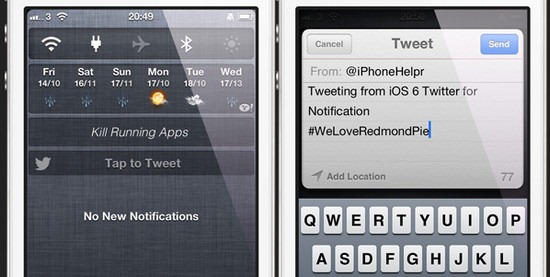
iOS 6 Twitter Widget for Notification Center adds the Tap to Tweet option right inside your notification bar sliding from top. Well you obviously need to enable that stuff by going inside the settings menu. Well you can install it by just searching it in cydia its available under Big Boss Repository.
Fullscreen for Safari simply make your browser full screen and removing that above status bar, with this tweak enabled your browsing experience will also be really enjoyable as you will have more space for your websites. You can search for it in cydia and install it out for free.
So this was the list of 9 tweaks which can grant your device with iOS 6 features right now before the official release, well obviously the officially version will have a butter smooth interface of all these apps but still if you need to access them right now than search all the apps above and install them out have fun :)
1. iOS 6 Twitter Widget for Notification Center :
iOS 6 Twitter Widget for Notification Center adds the Tap to Tweet option right inside your notification bar sliding from top. Well you obviously need to enable that stuff by going inside the settings menu. Well you can install it by just searching it in cydia its available under Big Boss Repository.
2. PhotoMail :
Using PhotoMail you can now easily attach images in your mail by copying and pasting the image from the photo app. This app is not free but you can get it as low as $1 just search it out and install and then visit your photo app and hold your finger on any image and than copy that image now just paste that image in your mail anywhere.3. Pull to Refresh for Mail :
Now like you pull and refresh the facebook updates in your facebook app, you can do that same action right in your mail app by just adding this small tweak and pulling to refresh your mails. Make a search for it in cydia and install this app for free.4. 3G Unrestrictor :
3G Unrestrictor simply allows you to use facetime or any other Wi-Fi using app to run by just using 3G services. So you can search it out in cydia and than install it and make sure that your internet plan is unlimited or else you will loose a huge amount of money.
 5. Fullscreen for Safari :
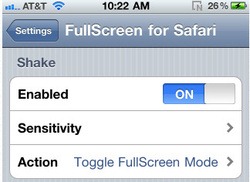
Fullscreen for Safari simply make your browser full screen and removing that above status bar, with this tweak enabled your browsing experience will also be really enjoyable as you will have more space for your websites. You can search for it in cydia and install it out for free. 5. Fullscreen for Safari :
6. StayOpened :
StayOpened is another cool tweak which will keep your iOS app store opened after your app downloads has been started usually it closes so with this tweak that thing will be fixed up. Search it out in Cydia and install it out for free.7. SiriSports for Assistant Extension :
With SiriSports you can another feature to your Siri which will help you in finding your sports events and showing you all the older details. So this one is pretty helpful and a must tweak which should be installed.8. Facebook This :
Now share your photos right from your photos app using the share options as now you will have Facebook sharing button after this tweak installed.9. Fusion :
With fusion installed you have integrated facebook in almost every part of your iOS device. Now your Siri also includes a way of sending your updates right by speaking to Siri.So this was the list of 9 tweaks which can grant your device with iOS 6 features right now before the official release, well obviously the officially version will have a butter smooth interface of all these apps but still if you need to access them right now than search all the apps above and install them out have fun :)
How to Make iOS Notification Center Blurred or Transparent
How to Make iOS Notification Center Blurred or Transparent
iOS Notification Center was the latest update given by apple in their iOS 5 firmware update and it simply took all the mess away by gathering all the notifications right at one place, calls, messages, WhatsApp and other facebook kind of notifications. Weather and Stocks were also seen in a beautiful way. Well one thing apple did not gave was the option to change how notification center looks changing its color and other stuff well right we are not talking about changing color but with FastBlurredNotificationCenter tweak by Ryan Petrich we can obviously make it blurred or transparent.
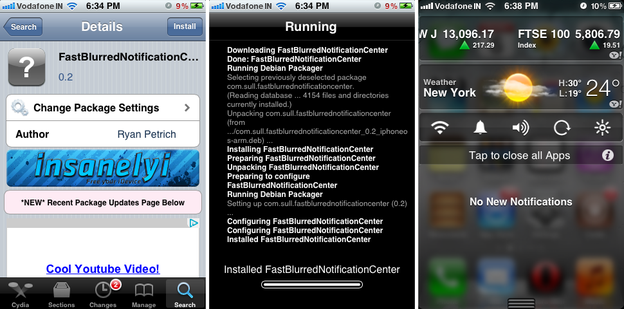
So as you can see in the last screenshot right above how iOS notification center is looking cool and awesome when its blurred, well this thing does not end right over here you have the option to make it transparent to scroll the slider to your own desired blurry level. So now you can easily bring some more interactivity in your notification center.
Installing this awesome tweak : Well if you wanna install this tweak on your iOS device just navigate to Cydia > Search and type down
So as you can see in the last screenshot right above how iOS notification center is looking cool and awesome when its blurred, well this thing does not end right over here you have the option to make it transparent to scroll the slider to your own desired blurry level. So now you can easily bring some more interactivity in your notification center.
Installing this awesome tweak : Well if you wanna install this tweak on your iOS device just navigate to Cydia > Search and type down
FastBlurredNotificationCenter now you will see it click on it and press on install. Now it will show some black screen with installation code running on it wait till it ends and asks you to restart your springboard, that’s it now just slide your notification center out and see that blurry effect. If you wanna change its setting just do it from settings menu.Sunday, October 21, 2012
Disable those Vibrations & Sounds on Charging in iPhone
 When
ever you plug your iPhone on charging using the external charger on
with any pc or laptop than you must have seen those vibrations and
sounds coming from your iPhone that may distract so if you are one of
those who wants to get rid of those sounds than there is a small tweak
in Cydia which you can install and than you can get rid of those
vibrations.
When
ever you plug your iPhone on charging using the external charger on
with any pc or laptop than you must have seen those vibrations and
sounds coming from your iPhone that may distract so if you are one of
those who wants to get rid of those sounds than there is a small tweak
in Cydia which you can install and than you can get rid of those
vibrations.PowerSoundDisabler is that tweak which does not need any kind of configuration for using it, you just find it install it and than reboot your iPhone to see that tweak in action.
How to Install PowerSoundDisabler from Cydia :
2. Now search for “PowerSoundDisabler” its from BigBoss Repo available for free.
3. Now just hit install and than reboot your iPhone after successful installation and now check your device for now vibrations and sounds when you put your iPhone on charging
How to Backup and Transfer your iPhone Contacts Easily
How to Backup and Transfer your iPhone Contacts Easily
iPhone is pretty awesome device in its applied technology and other things but when it comes to backup contacts than its really hard to do it on iPhone because there is no direct option to do that work so here we have another amazing iPhone app which can backup all your contacts easily and with no problem. My Contacts Backup is amazingly great app for use and works really perfect, you can simply install it right on your iPhone by searching it in the App Store and using the direct link give above. The best thing about this app is that its available for free and can be used without any restrictions, simply install and than backup. Well you will surely notice out some advertisement's running inside this app but that’s only for supporting the developer so you do not need to worry about anything.

Right above you can see is the simple user interface like you click on backup than backup starts and you get the option to Email your contacts backup. Now after you email your contacts and you format or reinstall your iPhone software like you update it than if you you don’t have any backup simply open the mail which contains your Contacts Backup and click on the .vcf file in the attachments and you will be shown a window asking to add all the contacts on your iPhone.
Right above you can see is the simple user interface like you click on backup than backup starts and you get the option to Email your contacts backup. Now after you email your contacts and you format or reinstall your iPhone software like you update it than if you you don’t have any backup simply open the mail which contains your Contacts Backup and click on the .vcf file in the attachments and you will be shown a window asking to add all the contacts on your iPhone.
How to Transfer iPhone Contacts to Other Device’s
You can even use these iPhone contacts on any other device as the format created by it that’s.vcf is universally recognizable on every phone including Windows machine, so just open up that mail or download that .vcf file from the mail and transfer that file to any other device now with just one click your all contacts will be visible on that device.How to Check iPhone’s Factory Lock Status Unlocked or Not
How to Check iPhone’s Factory Lock Status Unlocked or Not
This might be question that arises when ever anyone purchases a new or an old iPhone as Apple usually usually sell their devices with contact based system so you purchase your device with contract bundled with it and you are bond to use only one network sim. So people usually jailbreak their device to get other sim cards work on their device but everytime its not sure that we are going to receive jailbreak for every firmware released by iPhone so its better to go with the factory unlocked iPhone so that we do not have any problem using any sim card. So now if you are the one who wanna know how exactly you can check if the iPhone you are suing is factory unlocked or not than we have a simple online tool that can do this job easily.

So as you can see in the above image I just entered my IMEI number and got all the information which is pretty handy if you are just going to purchase a second hand device or you just wanna know for general knowledge. So just follow below steps on how you can check your iPhone lock status.
Check iPhone’s Sim Lock Status Online
iPhoneOX.com provides an easy online solution to check status of your iPhone using your IMEI number you get for every device. By just entering your IMEI number you will get every possible technical information about your iDevice. Like you will see your model number, support and warranty time left, activation status, registration status, and sim card lock status that the most important thing you have to see.So as you can see in the above image I just entered my IMEI number and got all the information which is pretty handy if you are just going to purchase a second hand device or you just wanna know for general knowledge. So just follow below steps on how you can check your iPhone lock status.
- Just visit iPhoneOX.com
- Now enter your device IMEI number you can get that by going to Settings > General > About, now scroll down and check the IMEI field.
- That’s the 15 digit number you need to enter and press Check!
- Now it will process your number and show you the status for free.
Subscribe to:
Posts (Atom)